





























































 AI Tools in Premiere
1 day
In centre:
£please call
Live online:
£please call
Key details
A range of powerful AI tools are available to Adobe Premiere users to intelligently generate and edit video and audio and dramatically speeding up workflows.
This course is ideal for existing Premiere users who want to make full use of the latest AI features available. Sessions include:
Intelligent video creation
- Firefly Boards: You can brainstorm and build storyboards, generate videos, tweak them using generative AI tools, and import them into Premiere for editing.
- AI-generated videos and sound: Generate new video and audio, and edit existing video and audio, directly in your timeline.
Intelligent video editing and workflow
- AI Assistant: Use natural language to automate editing tasks, organise footage, generate smart bins based on clip content, and quickly build rough-cut sequences.
- Morph Cut transitions: Smooth out jump cuts and hide “ums” and “ahs” in talking head interviews.
- Generative Extend: Automatically add frames to the beginning or end of a clip to extend its duration, matching the motion, lighting and background seamlessly.
- Auto Reframe: Intelligently track the main subject in your video and keep it centred when adapting widescreen footage (16:9) into square (1:1) or vertical (9:16) formats for social media.
- Object Mask: Hover and click to create, refine and track precise masks of complex moving subjects quickly.
- Text-Based Editing: Automatically analyse and transcribe your footage. You can edit your video timeline by cutting, copying and pasting text of dialogue, just like editing a Word document.
- Auto-transcribing using Speech-to-Text: Automatically generate accurate text captions from your video audio, and translate those captions into different languages.
- Scene Edit Detection: Automatically analyse pre-edited footage and place cut points at scene changes.
Colour and graphics
- Auto Colour: Automatically correct exposure, contrast and white balance to give your footage an instant baseline polish.
- Colour Match: Match the colour grading of one clip to another across your entire timeline.
Audio
- Remix: Intelligently analyse music tracks and stretch or shorten the clip to fit the length of your video, avoiding awkward cut-offs.
- Enhance Speech: Remove distracting background noise and turn muffled dialogue into clear, studio-quality audio.
- Auto Ducking: Automatically lower the volume of your background music when someone is speaking.
- AI Audio Category Tagging: Automatically analyse audio clips and label them as dialogue, music, sound effects or ambiance, giving you access to the tools relevant to that audio type.
AI Tools in Premiere training is arranged on-request, i.e. one-to-one training or a ‘closed course’ for your group. Your training can be tailored to take into account any existing knowledge you have, and the work you’re going to be doing.
In-class or online
This course is available in-class at eight centres or live online.
Expert trainers
AI Tools in Premiere courses are hosted by an Adobe Premiere expert. See Expert trainers.
How will I learn?
Training combines lecture, demonstration and hands-on practice.
Practical exercises provide activity-based experience. These exercises can be tailored to deal with issues specific to your business. You have ample opportunity to discuss specific requirements with the trainer.
Training guide and certificate
Course delegates receive:
- A practical training guide, to refer to during the course and use as a refresher after. Choose from a printed guide or PDF.
- An e-certificate confirming successful completion of an AI Tools in Premiere training course.
After course support
Following AI Tools in Premiere training, delegates are entitled to 30 days’ email support from their trainer to help with any post-course issues. For further details, see Support.
Prerequisites
Delegates should be familiar with the fundamentals of Premiere, including techniques for basic video editing and refining, generating effects and transitions, audio editing, slow and fast motion, titling and multicam editing.
General information
Payment
Payment for AI Tools in Premiere training can be made by:
- Bank transfer. Please call 01527 834783 for our bank details.
- Card. Visa, Mastercard and American Express cards accepted. Payment can be made securely online or over the phone. Armada doesn’t record or store your card details.
- Buy now pay later. Available for private bookings; pay in 4 x interest-free fortnightly instalments. Facility provided by Clearpay. For details, see Clearpay terms of service.
Purchase orders
We accept purchase orders from UK registered companies with turnover in excess of £1m, and public sector organisations
Accommodation
See Accommodation local to our training centres.
Cancellations and postponements
If an on-request AI Tools in Premiere course booking is cancelled giving less than 20 working days’ notice, a cancellation fee is payable. View cancellation terms.
If an on-request AI Tools in Premiere course booking is postponed giving less than 20 working days’ notice, a postponement fee is payable. View postponement terms.
Terms and conditions
Expert trainers
Marek Mularczyk

Marek is an Adobe Design, Video and Motion Specialist, and an Adobe Certified Instructor (ACI).
He has specialist knowledge of the key Adobe Creative applications: InDesign, Photoshop, Illustrator, After Effects and Premiere, as well as Adobe Express and Firefly.
Voted as one of top 10 Adobe Certified Instructors in the world, Marek has over 15 years’ experience as an animator and photo/video editor, and has published numerous books on these topics.
As an instructor, Marek has trained a wide range of blue-chip clients including Lloyds, Barclays, HS2, Lululemon, Asos, Boohoo, Sony, Samsung, and many more.
Prior to focusing on training, Marek worked as a professional photographer for over 12 years. Photography remains his passion, and in his spare time he travels Europe in search of that perfect picture.
Live online training
Live online training lets you participate in a course from your place of work or home.
We do everything possible to make your online training experience as close as possible to actually being in the classroom. You can:
- See and hear our trainer, and the other delegates participating in the course…
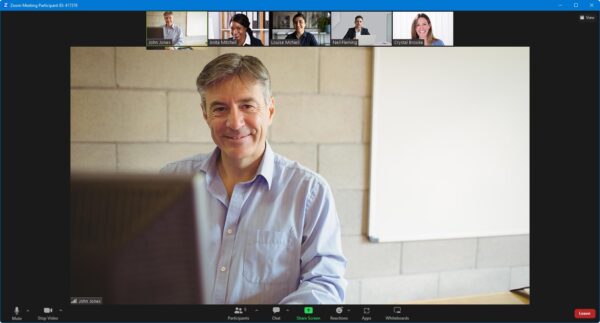
- Interact by speaking, using chat, or raising your ‘virtual hand’ if you need assistance.
- Share your screen with our trainer, and allow them to take control to explain something.
Like our in-class courses, online courses…
- Are presented by expert instructors.
- Give you plenty of opportunity to carry out assisted, practical exercises.
- Offer 30 days’ email support from your trainer.
All you need is an Internet-connected computer with a webcam and audio capability. We provide everything else…
- Links to download the files, resources, etc. you’ll use in your course.
- A training guide. For most courses, you can choose from a printed copy that we post to you, or a PDF.
In the week before your course, we’ll send you an email containing everything you need to prepare for and participate in the training. We’re available in the days ahead of your course to assist if you need any help.
Please note that we are not able to record scheduled online courses for privacy reasons.
When you attend live online training, you’re participating in a real course, hosted by a real trainer, in real time