


























































 NavisWorks training
2 days
In centre:
Not available
Live online:
£please call
Key details
Comprehensive NavisWorks training for newcomers, teaching how to combine 3D models from cross disciplines into one scene, enabling effective review and analysis.
Sessions include:
- Generating visual project model reviews.
- The TimeLiner – creating construction simulations of project models to check the validity of schedules.
- Using the Animator and Scripter features to create interactive animations.
- Using the Presenter, adding true-to-life materials, lighting and backgrounds to project models.
- Clash detection.
This course is ideal for new users of NavisWorks Manage or NavisWorks Simulate.
NavisWorks training is most effective when it’s provided ‘on-request’, i.e. one-to-one training or a ‘closed’ course for your group. Rather than just teach you generic techniques, we can base the training on your project models, showing you specifically the work you need to do. For this reason, we don’t offer scheduled (public) NavisWorks courses.
Live online NavisWorks training
NavisWorks courses are available in our popular live online format. We don’t currently offer NavisWorks training in-class.
Accredited NavisWorks training
Armada is an Autodesk authorised Training Centre (ATC), and our NavisWorks training courses are accredited by Autodesk.
NavisWorks courses are hosted by Autodesk Certified Instructors with vast experience of using the application professionally. See Expert trainers.
How will I learn?
NavisWorks training is hands-on and practical.
Our trainers teach the necessary theory then demonstrate techniques step-by-step. You then practice the techniques taught on a computer running NavisWorks.
There is plenty of time to ask questions, and you can take away all the files you create.
Training guide and certificate
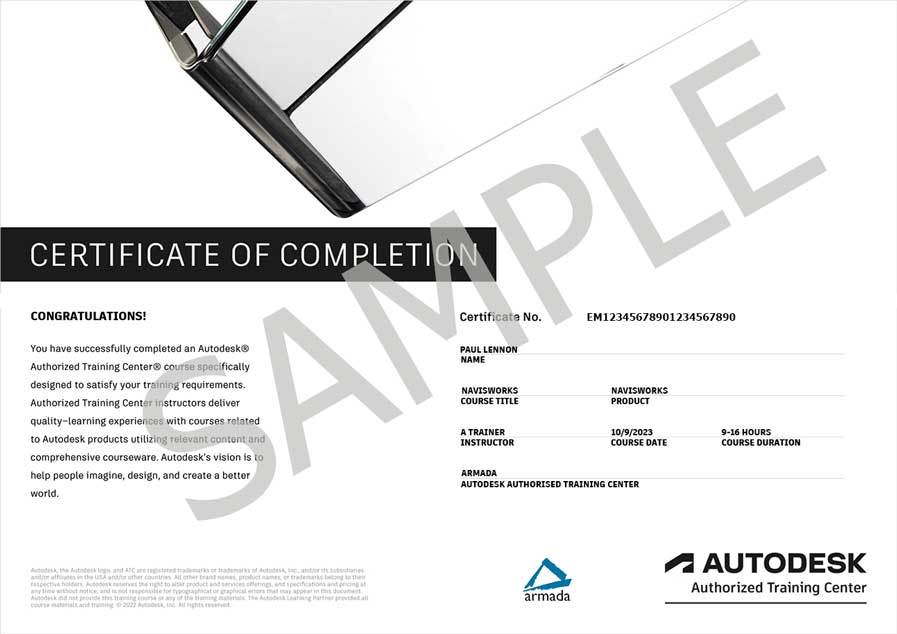
Course delegates receive an e-certificate confirming successful completion of an accredited NavisWorks training course. Click here to see an example of the certificate you receive.
Because this training is typically bespoke, tailored to each client’s specific project models, there isn’t an appropriate training guide. Delegates take their own notes through the course.
After course support
Following NavisWorks training, delegates are entitled to 30 days’ email support from their NavisWorks trainer to help with any post-course issues. For further details, see Support.
Prerequisites
Delegates should have a good working knowledge of an Autodesk application, such as AutoCAD or Revit.
NavisWorks version
Training can be based on any recent version of NavisWorks to suit you.
General information
Payment
Payment for NavisWorks training can be made by:
- Bank transfer. Please call 01527 834783 for our bank details.
- Card. Visa, Mastercard and American Express cards accepted. Payment can be made securely online or over the phone. Armada doesn’t record or store your card details.
- Buy now pay later. Available for private bookings; pay in 4 x interest-free fortnightly instalments. Facility provided by Clearpay. For details, see Clearpay terms of service.
Purchase orders
We accept purchase orders from UK registered companies with turnover in excess of £1m, and public sector organisations
Accommodation
See Accommodation local to our training centres.
Cancellations and postponements
If an on-request NavisWorks course booking is cancelled giving less than 20 working days’ notice, a cancellation fee is payable. View cancellation terms.
If an on-request NavisWorks course booking is postponed giving less than 20 working days’ notice, a postponement fee is payable. View postponement terms.
Terms and conditions
Expert trainers
NavisWorks training courses are hosted by:
Martin McCann

Martin McCann qualified as an Architect in 1986, and he holds a teaching certificate (further and adult education).
He is a long-established Autodesk Certified Instructor (ACI), a capacity in which he has taught thousands of professionals, including Architects, Structural Engineers and Mechanical Engineers, for over 20 years.
Martin has expert knowledge of Revit, NavisWorks, ReCap, AutoCAD and AutoCAD Architecture, amongst other Autodesk applications.
He has been commissioned by Autodesk on multiple occasions to host sessions for them at locations including New York, Chicago, Moscow, Milan and Munich. He has trained Autodesk’s staff and many other Autodesk Certified Instructors, and has operated as a visiting Lecturer at the University of Northumbria and Cambridge School of Art.
Martin is the author of the McCann’s BIM Guides series of published Revit training manuals.
Nebille Al-Wahid
Nebille studied architecture at University, achieving a high-grade BSc and an MSc distinction.
Over the last 20 years, he has worked for architectural practices, local authorities and numerous blue-chip clients in the construction and related industries.
Roles Nebille has carried out include Architectural Technician, Visualiser/Animator, Revit/BIM Coordinator, Software Developer and Consultant. He specialises in project setup, family creation and team structures/collaboration.
Alongside his hands-on work, Nebille hosts regular courses in 3ds Max, AutoCAD, Revit and NavisWorks. He has been an Autodesk Certified Trainer since 2006.
Marnus van Staden

Marnus van Staden is an experienced professional with over a decade of expertise in Autodesk software instruction and consulting. With a strong civil engineering background, Marnus has contributed to many projects including railways, bridges, commercial and residential buildings, and complex steel and concrete structures.
As an instructor, Marnus has spent 10 years helping clients gain confidence in using Autodesk tools like AutoCAD, AutoCAD Electrical, Civil 3D, Revit, Navisworks, Infraworks, Inventor, Vault and BIM 360, creating customised instruction programs for a diverse range of industries.
Known for his practical, hands-on approach, Marnus offers a first-class experience to individuals and organisations looking to elevate their Autodesk skills and project efficiency.
Marnus continues to work as an Autodesk consultant, advising clients on best practices and tailored solutions to boost productivity and project outcomes.
Course content
Getting started with NavisWorks
- Workspace
- Opening and appending files
- Saving, merging and refreshing files
- About file types
- Database support
Visual project model reviews
- Navigation
- Absolute coordinate display
- The NavisWorks engine
- Performance indicators
- Selection tree and selecting objects
- Hiding objects and overriding materials
- Object properties
- Measuring and moving objects
- Selection and search sets
- Viewpoints
- Comments and redlining
- Animations
- Sectioning
- Hyperlinks
- Comparing models
- Switchback
- NavisWorks real-time rendering
TimeLiner
- TimeLiner overview
- Creating tasks
- Importing tasks from an external project file
- TimeLiner simulation
- Configuring and defining a simulation
- Simulation export
Animator
- Animator overview
- Creating a basic animation
- Cameras and camera viewpoints
- Manipulate geometry objects in an animation set
- Section plane sets
- Controlling animation scene playback
Scripter
- Scripter overview
- Creating and managing scripts
- Events
- Creating and configuring actions
Presenter basics
- Presenter overview
- Apply materials to model items
- Adding lighting effects to a scene
- Adding background effects
- Rendering effects
- Outputting rendered images
- Outputting animations (videos)
Presenter advanced features
- Editing and managing materials
- Advanced material editing
- Ground planes
- Individual light effects
- Image-based lighting
- Environment backgrounds and reflections
- Custom environments
- Light scattering
- Rich Photorealistic Content (RPC)
Clash Detection
(NavisWorks Manage only)
- Clash Detection overview
- Selecting items to be clashed
- Clash test settings
- Setting clash rules
- Clash results
- Clash test reporting
- Audit checks
- Create and save batches of clash tests
- Export and import clash tests
- Custom clash tests
- Setting up custom clash tests
- Laser scan data clashing
- Holding and releasing objects
- SwitchBack in clash detective
- Time-based clashing
Live online training
Online training lets you participate in a live Navisworks course from your place of work or home.
We do everything possible to make your online training experience as close as possible to actually being in the classroom. You can:
- See and hear our trainer, and the other delegates participating in the course…
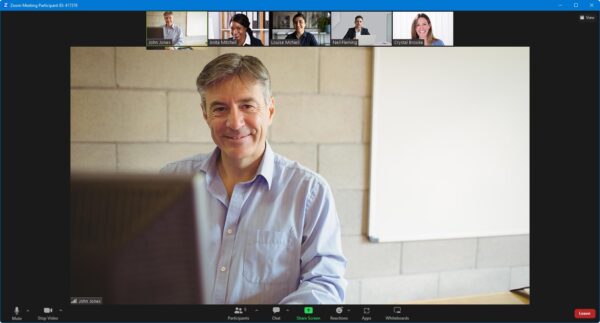
- Watch our trainer demonstrate techniques in Navisworks.
- Interact by speaking, or using chat.
- Share your screen with our trainer, and allow them to take control to explain something.
Like our in-class courses, online NavisWorks courses…
- Are presented by Autodesk Certified Instructors.
- Give you plenty of opportunity to carry out assisted, practical exercises using Navisworks.
- Offer 30 days’ email support from your trainer.
All you need is an Internet-connected computer with…
- Navisworks installed. If you don’t have a current subscription to Navisworks, you’re entitled to a 30-day trial that’s ideal for participating in training. We’ll send you a link to this. If you’ve already used your trial, we can lend you a license for the duration of your course.
- A webcam and audio capability. If your computer running Navisworks doesn’t have these, you can use a second device, such as another computer or tablet. See Hardware recommendations for live online training for further details.
If there’s anything you’re not sure about we’ll do our best to help you. We won’t be able to assist with your Navisworks installation, but we can provide details for Autodesk support who’ll be able to help you with this.
We provide everything else…
- Links to download the files, resources, etc. you’ll use in your course.
- A training guide. For most courses, you can choose from a printed copy that we post to you, or a PDF.
In the week before your course, we’ll send you an email containing everything you need to prepare for and participate in the training. We’re available in the days ahead of your course to assist if you need any help.
Please note that we are not able to record scheduled online courses for privacy reasons.
When you attend live online training, you’re participating in a real course, hosted by a real trainer, in real time
Neil W - January 2026
Mark H - December 2024
Andrei B - October 2020

Related blog posts
 06/03/2019
What is BIM and why should I embrace it?
06/03/2019
What is BIM and why should I embrace it?