





























































 Vault Administrator training
1 day
In centre:
£please call
Live online:
£please call
Key details
Course for Autodesk Vault administrators, teaching how to implement and carry out day-to-day maintenance of Vault Basic, in an organised way that makes it easy for users to reference, share and reuse design data.
Sessions include:
- An introduction to Vault and the Autodesk Data Management Server.
- A typical Vault workflow.
- Basic Vault Tasks.
- Organising and populating your Vault.
- Managing users and access
- Managing file properties
- Backing up your Vault.
- General Vault maintenance and housekeeping.
This course is ideal for administrators responsible for setting up and maintaining Vault Basic. Administrator training isn’t available for users of Vault Professional.
Vault Administrator training is arranged on-request, i.e. one-to-one training or a ‘closed course’ for your group. Your training can be tailored to take into account any existing knowledge you have, and the work you’re going to be doing.
In-class or online
This course is available in-class at eight centres or live online.
Course times are 9.30am–4.30pm in both formats.
Accredited Vault training
Armada is an Autodesk Authorised Training Centre (ATC), accredited to provide training in Vault.
Courses are hosted by an Autodesk Certified Instructor with expert knowledge of the application. See Expert trainer.
How will I learn?
Vault training is hands-on and practical.
Our trainers teach the necessary theory then demonstrate techniques step-by-step. You then practice the techniques taught on a computer running Vault.
There is plenty of time to ask questions, and you can take away all the files you create.
Vault training guide and certificate
Course delegates receive:
- A comprehensive training guide for Vault, to refer to throughout the course, and to use as a refresher afterwards.
- An e-certificate confirming successful completion of an accredited Vault training course.
After course support
Following Vault training, delegates are entitled to 30 days’ email support from their Vault trainer to help with any post-course issues. For further details, see Support.
Prerequisites
Delegates should be familiar with the fundamentals of the application with which they’re going to use Vault, i.e. AutoCAD or Inventor.
Vault version
Training can be based on any recent version of Vault Basic. We’re not able to provide training in Vault Professional.
General information
Payment
Payment for Vault Administrator training can be made by:
- Bank transfer. Please call 01527 834783 for our bank details.
- Card. Visa, Mastercard and American Express cards accepted. Payment can be made securely online or over the phone. Armada doesn’t record or store your card details.
- Buy now pay later. Available for private bookings; pay in 4 x interest-free fortnightly instalments. Facility provided by Clearpay. For details, see Clearpay terms of service.
Purchase orders
We accept purchase orders from UK registered companies with turnover in excess of £1m, and public sector organisations
Accommodation
See Accommodation local to our training centres.
Cancellations and postponements
If an on-request Vault Administrator course booking is cancelled giving less than 20 working days’ notice, a cancellation fee is payable. View cancellation terms.
If an on-request Vault Administrator course booking is postponed giving less than 20 working days’ notice, a postponement fee is payable. View postponement terms.
Terms and conditions
Expert trainer
John Billyard

John has used CAD software for over 35 years, providing high quality engineering and architectural designs to a wide range of clients
He has provided training in the applications he uses for a similar length of time, and for the last 15 years, has been commissioned directly by Autodesk to provide consulting and training services to their corporate client base.
John hosts courses in various Autodesk applications including AutoCAD, Fusion, Inventor and Vault. He also trains Dassault Systèmes’ SolidWorks, Trimble SketchUp and Epic Games’ Twinmotion.
He takes pride in keeping pace with the latest industry design tools and technologies; enabling him to meet the challenges and demands of an ever changing working environment.
Course content
Introduction to Autodesk Vault
- Autodesk Data Management Server
- Vault Clients
- A Typical Vault Workflow
Basic Vault Tasks
- Accessing the Vault
- Vault User Interface
Organising and Populating a Vault
- How Autodesk Inventor Files are Organised
- Adding Existing Models to a Vault
Managing Vault
- Setting Up Vault
- Managing Users and Access
- Managing File Properties
- Backing Up and Restoring Vaults
- General Vault Maintenance and Housekeeping
Live online training
Online training lets you participate in a live Vault course from your place of work or home.
We do everything possible to make your online training experience as close as possible to actually being in the classroom. You can:
- See and hear our trainer, and the other delegates participating in the course…
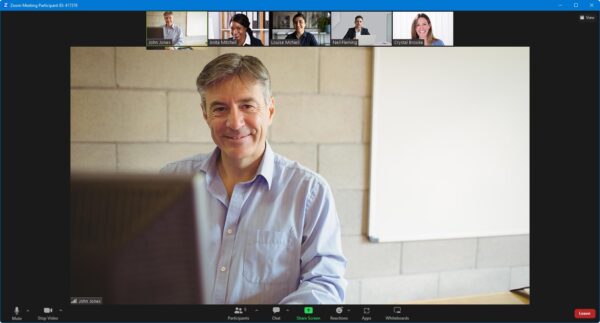
- Watch our trainer demonstrate techniques in Vault.
- Interact by speaking, or using chat.
- Share your screen with our trainer, and allow them to take control to explain something.
Like our in-class courses, online Vault Administrator courses…
- Are presented by Autodesk Certified Instructors.
- Give you plenty of opportunity to carry out assisted, practical exercises using Vault.
- Offer 30 days’ email support from your trainer.
All you need is an Internet-connected computer with…
- Vault installed. If you don’t have a current subscription to Vault, you’re entitled to a 30-day trial that’s ideal for participating in training. We’ll send you a link to this. If you’ve already used your trial, we can lend you a license for the duration of your course.
- A webcam and audio capability. If your computer running Vault doesn’t have these, you can use a second device, such as another computer or tablet. See Hardware recommendations for live online training for further details.
If there’s anything you’re not sure about we’ll do our best to help you. We won’t be able to assist with your Vault installation, but we can provide details for Autodesk support who’ll be able to help you with this.
We provide everything else…
- Links to download the files, resources, etc. you’ll use in your course.
- A training guide. For most courses, you can choose from a printed copy that we post to you, or a PDF.
In the week before your course, we’ll send you an email containing everything you need to prepare for and participate in the training. We’re available in the days ahead of your course to assist if you need any help.
Please note that we are not able to record scheduled online courses for privacy reasons.
When you attend live online training, you’re participating in a real course, hosted by a real trainer, in real time