

- CAD design training
- Creative, video and animation training
- e-Learning and web development training
- Business, media and technical writing training
- Microsoft and AI training



























































 Introduction to Premiere training
2 days
In centre:
£395+ VAT
Live online:
£345+ VAT
Dates and booking
Key details
Adobe Premiere training course for beginners, teaching key techniques for editing video and adding stunning effects.
Sessions include:
- Importing and organising media assets
- Editing techniques
- Refining the edit
- Adding effects and transitions
- Audio editing
- Slow and fast motion
- Titling
- Multicam editing
- Adobe Stock – accessing high-quality clips
- Exporting.
Throughout the course, you’ll explore the AI features available to automate tasks and speed up workflows. The AI features covered include:
- Morph Cut transitions
- Remix
- Generative Extend
- Auto Reframe
- AI-generated videos and sound
- Firefly Boards
This course is ideal for newcomers to Premiere, and those with limited Premiere experience.
Upcoming course dates
In-class or online
This course is available in-class at eight centres or live online.
Course times are 9.30am–4.30pm in both formats.
Expert trainers
Premiere courses are hosted by Adobe Certified Professionals with vast experience of using the application professionally. See Expert trainers.
How will I learn?
Premiere training is hands-on and practical.
Our trainers teach the necessary theory then demonstrate techniques step-by-step. You then practice the techniques taught on a computer running Premiere. You’ll have plenty of opportunities to ask questions.
Windows or Mac
Premiere works almost identically on the Windows and Mac platforms, and our course is suitable for users of both platforms. (There are some minor differences, but nothing of significance.)
Our centres offer both Windows computers and Macs for delegates to use, so you can carry out exercises on the platform you’re familiar with.
Premiere training guide and certificate
Course delegates receive:
- A practical Premiere training guide, to refer to during the course and use as a refresher after. Choose from a printed, bound guide or a PDF – whatever suits you best. If you’re participating online and you choose a printed guide, we’ll post this to you.
- An e-certificate confirming successful course completion. Click here to see an example of the certificate you receive.
After course support
Following Premiere training, delegates are entitled to 30 days’ email support from their Premiere trainer to help with any post-course issues. For further details, see Support.
Prerequisites
No prior Premiere knowledge is necessary.
Premiere version
Training is based primarily on Premiere 2026. The techniques taught are relevant to all recent releases of Premiere.
All Premiere training is suitable for both Windows and Mac users.
Follow-on courses
Our guarantees to you
We offer:
- A price guarantee that you’re getting the best value for money.
- A training guarantee that you’ll learn the concepts and skills you need.
On-request Premiere training available
Introduction to Premiere training is also available on-request, i.e. one-to-one training or a ‘closed course’ for your group, hosted at one of our centres, your venue or online.
On-request Premiere training can be tailored to take into account any existing knowledge you have, and the work you’re going to be doing. Please contact us for a quote.
General information
Payment
Payment for Premiere training can be made by:
- Bank transfer. Please call 01527 834783 for our bank details.
- Card. Visa, Mastercard and American Express cards accepted. Payment can be made securely online or over the phone. Armada doesn’t record or store your card details.
- Buy now pay later. Available for private bookings; pay in 4 x interest-free fortnightly instalments. Facility provided by Clearpay. For details, see Clearpay terms of service.
Purchase orders
We accept purchase orders from UK registered companies with turnover £1m+, and public sector organisations.
Cancellations and transfers
You can cancel a booking on a scheduled training course, or transfer to a later course, without penalty providing you give us 10 working days’ notice. Any fees already paid will be refunded.
If you cancel a booking on a scheduled Introduction to Premiere course giving less than 10 working days’ notice, or request a transfer to a later course, a cancellation/transfer fee is payable. The fee charged depends on the notice period given. For details, see cancellation terms.
Different terms apply for the cancellation or postponement of an on-request course (one-to-one training or a ‘closed course’ for your group). For details, see course cancellations.
Terms and conditions
Training course bookings are subject to our terms and conditions.
Expert trainers
Introduction to Premiere training courses are hosted by:
Marek Mularczyk

Marek is an Adobe Design, Video and Motion Specialist, and an Adobe Certified Instructor (ACI).
Voted as one of top 10 Adobe Certified Instructors in the world, Marek has over 15 years’ experience as an animator and photo/video editor, and has published numerous books on these topics.
As an instructor, Marek has trained a wide range of blue-chip clients including Lloyds, Barclays, HS2, Lululemon, Asos, Boohoo, Sony, Samsung, and many more.
Prior to focusing on training, Marek worked as a professional photographer for over 12 years. Photography remains his passion, and in his spare time he travels Europe in search of that perfect picture.
Alistair Dabbs

Alistair is a highly-experienced trainer with expert knowledge of various Adobe creative applications including InDesign, Photoshop, Illustrator, After Effects and Premiere Pro. He has held Adobe Certified Instructor (ACI) status for almost 20 years, delivering courses in both English and French.
Alistair has worked in a wide range of publishing roles including prepress production, graphic design and editorial production. He has delivered workshops and chaired debates at IT industry conferences.
When not training, Alistair works as a journalist and technical writer, writing on topics including digital imaging, computer arts, fintech, data security, AI and VR. He is a regular contributor to various computer and graphic arts magazines including The Register and Ars Technica, and is the author/co-author of several published books, including the best-selling Digital Designer’s Bible.
Wolf Winter

For over 30 years, Wolf has worked as a professional Visual Effects Artist, specialising in Motion Graphics, 2D and 3D animations and compositing, mainly in the film and broadcast television industries.
Wolf has worked as a professional trainer and university lecturer for over 15 years, equipping hundreds of people with skills to bring their ideas to life.
He trains people to a professional level in a range of industry-standard applications, including Autodesk 3ds Max and Maya, Adobe After Effects, Premiere Pro and Audition, and Maxon Cinema 4D.

Course content
Getting Started
- Opening an existing project
- Creating a new project
- The Premiere interface
- The Toolbar
- Preferences
- Keyboard shortcuts
Importing and Organising Media Assets
- Importing video and audio files
- Importing files using the Media Browser
- The Project panel
- Icon, List and Freeform views
- Using the Storyboard
- Creating a storyboard rough cut
- Metadata
Basic Editing
- Introduction to video editing
- Making selections
- Understanding frame rates and resolutions
- Creating new sequences from presets
- Creating new sequences automatically
- Moving clips to the timeline
- Moving, trimming and deleting clips on the Timeline
- Locking and muting tracks
- Track headers
- Timeline and clip markers
- Subclips
- The Source monitor
- The Program monitor
- Editing clips with in and out points
- Inserting and overwriting edits
- Snapping
- Working with linked selection
Refining the Edit
- The toolbar
- Track Select tools
- Ripple and rolling edits
- Slip and Slide edits
- Moving clips in the timeline
- Lift and Extract
- Extracting a video frame as an image
- Nesting sequences
Transitions
- Adding transitions
- Jump cuts and transitions
- Morph Cut transitions (AI)
- Setting a default transition
- Single-ended transitions
- Editing transitions
- Rendering and previews
Audio Editing
- Adding music to your sequence
- Adjusting clip volume
- Audio Gain
- Extending audio clips
- Remix (AI)
Slow and Fast Motion
- Introduction to clip speed adjustment
- Rate stretch
- Speed/Duration
- Creating super-smooth slow motion
Additional Editing Techniques and Titling
- Replacing clips on the Timeline
- Generative Extend (AI)
- Adding text-based titles
- Customising text-based titles
- Creating lower thirds
- Adding graphics/shapes to your titles
Multicam
- Creating a multicam source sequence
- Synchronising clips for multicam
- Selecting cameras to use
Adobe Firefly AI Features
- AI-generated videos
- AI-generated sound effects
- Firefly Boards
Adobe Stock
- Accessing high-quality stock videos, audio and motion graphic templates
Exporting
- Popular video formats
- Popular audio formats
- Cross-platform export options
- Auto Reframe (AI)
- Exporting to web-ready video
- Exporting directly from Premiere
- Exporting with Adobe Media Encoder
Live online training
Online training lets you participate in a live Premiere course from your place of work or home.
We do everything possible to make your online training experience as close as possible to actually being in the classroom. You can:
- See and hear our trainer, and the other delegates participating in the course…
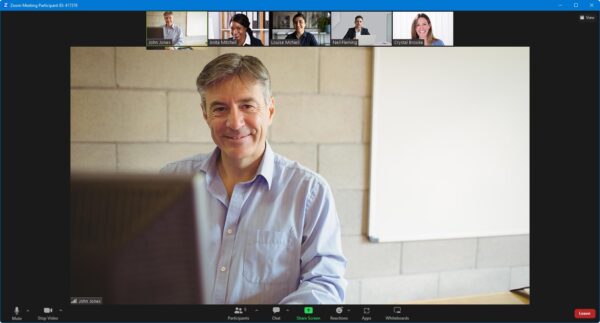
- Watch our trainer demonstrate techniques in Premiere.
- Interact by speaking, or using chat.
- Share your screen with our trainer, and allow them to take control to explain something.
Like our in-class courses, online Introduction to Premiere courses…
- Are presented by Adobe Certified Instructors.
- Give you plenty of opportunity to carry out assisted, practical exercises using Premiere.
- Offer 30 days’ email support from your trainer.
All you need is an Internet-connected computer with…
- Premiere installed. If you don’t have access to Premiere, we can usually send you a link to fully-functional trial software to download and install.
- A webcam and audio capability. If your computer running Premiere doesn’t have these, you can use a second device, such as another computer or tablet. See Hardware recommendations for live online training for further details.
If there’s anything you’re not sure about we’ll do our best to help you. We won’t, however, be able to assist with your Premiere installation.
We provide everything else…
- Links to download the files, resources, etc. you’ll use in your course.
- A training guide. For most courses, you can choose from a printed copy that we post to you, or a PDF.
In the week before your course, we’ll send you an email containing everything you need to prepare for and participate in the training. We’re available in the days ahead of your course to assist if you need any help.
Please note that we are not able to record scheduled online courses for privacy reasons.
When you attend live online training, you’re participating in a real course, hosted by a real trainer, in real time
Discounts and bundles
To make your Premiere training as affordable as possible, we offer:
- A discounted Premiere training bundle.
- A range of training discounts on our scheduled (public) Premiere training courses.
- A price guarantee that you won’t get Premiere training for less.
Adobe Premiere training bundles
Book places on:
- Introduction to Premiere(2 days), and
- Intermediate/Advanced Premiere Pro (2 days)
for £695 + VAT (classroom-based) or £595 + VAT (live online training), saving £95 + VAT in both cases.
The bundle price will be applied automatically when you add these two courses to your basket.
Training discounts
Multiple places
If you book multiple places on scheduled (public) training courses, we offer:
- 5% discount if you book two places.
- 10% discount if you book three places.
- 15% discount if you book four places.
- 20% discount if you book five or more places.
This can be for several people attending one course, one person attending several courses, or a combination.
These discounts are available for both classroom-based courses and live online training.
Concessions
We offer a 10% discount on scheduled Premiere course places to:
- Students, teachers and lecturers.
- People who work for a registered charity.
- ISTC members.
These discounts are available for both classroom-based courses and remote training.
Please call us if you qualify for a discount. Evidence of your status that entitles you to a discount may be requested.
Terms and exclusions
Only one of the above discounts can be applied to any booking.
The above discounts are not available for on-request course bookings (one-to-one training or a ‘closed course’ for your group).
Price guarantee
When you book training with Armada, we want you to be certain that you’re not paying over-the-odds. So, if you book a place on any scheduled (public) course and then find the same course at a lower price elsewhere, we will match that price.
To qualify for the price match:
- The course you find must be comparable. By this we mean it must:
- Cover the same subject.
- Be the same duration or longer.
- For classroom-based courses, be in the same region, i.e. within 50 miles of our centre.
- For online training, be a live course, i.e. not pre-prepared e-learning content.
- The lower price must be advertised on the other company’s website.
To claim a price match, just call any time before attending your course and tell us where you saw the price.
Natalie M - December 2025
Rachel B - September 2025
Brogan C - July 2025
Mark P - June 2025
Michelle J - June 2025
Gemma B - November 2024
Mark C - October 2024
Adaen T - September 2024
Lewis G - June 2024
Cameron P - May 2024
Jennifer H - May 2024
Philippa L - April 2024
Zara W - February 2024
Caitlin W - January 2024
Sally P - December 2023
Adrian M - November 2023
Aine H - November 2023
Nick C - November 2023
Selma A - July 2023
Trevor B - January 2023
Matthew L - December 2022
Claire W - October 2022
Allisha C - October 2022
Bobby J - September 2022
Hannah J - July 2022
Thomas M - June 2022
Oliver C - June 2022
Sarah C - April 2022
Issy C - April 2022
Oliver M - April 2022
Amy H - February 2022
Emmie M - February 2022
Matthew P - February 2022
Michelle H - January 2022
Joe R - December 2021
Christopher N - November 2021
Stephen S - November 2021
Lizzy K - September 2021
Molly C - September 2021
Rachel K - August 2021
Lee K - August 2021
Joshua D - July 2021
Verity B - May 2021
Zoe H - May 2021
Sarah C - May 2021
Britt L - May 2021
Rosalind B - May 2021
Matthew P - April 2021
Jenny H - April 2021
Eric J - April 2021
Sarah M - April 2021
Lizzie B - March 2021
Daniel H - March 2021
Chris M - March 2021
Jason B - March 2021
Louise G - February 2021
Neil D - January 2021
George C - January 2021
Jeff D-K - January 2021
Navraj S - January 2021
Charis F - December 2020
Damion N - December 2020
Huzafa B - November 2020
Oli D - November 2020
Izzie T - October 2020
Shamaila Z - June 2020
”
Jenni P - March 2020
”
Michael W - February 2020
Anni L - September 2019
Helen B - August 2019
Peter S - July 2019
James E - April 2019
Drew C - March 2019
Oli D - December 2018
Lauren A - November 2018
Josh - July 2018
Emma J - May 2018
Cynthia M - April 2018
Lauren A - April 2018
Claire S - February 2018
Adele B - February 2018
Caroline A - November 2017
Jenna B - November 2017
John E - November 2017
Stuart R - November 2017
Kate A - November 2017
Russell D - November 2017
Richard B - November 2017
Maria B - November 2017
Related blog posts
 20/05/2020
Premiere Pro tips… Great kit for filming on a budget
20/05/2020
Premiere Pro tips… Great kit for filming on a budget
29/06/2020
Premiere Pro tips… Inspecting and altering audio channels
02/09/2020
Premiere Pro tips… Adding or altering timecode
03/09/2020
Premiere Pro tips… putting in place an optimum lighting setup